
 Texas 67 Systems
Call 469-907-5567
Texas 67 Systems
Call 469-907-5567
Commercial network installation in Collin County
Business network installation in Collin County
Plan the wired and wireless network around how the space is used, then leave behind a tested, organized, and supportable environment.
What the work covers
Network installation that accounts for the whole space
A reliable business network is more than a modem, switch, and a few cables. Texas 67 Systems plans around the internet handoff, equipment location, cable paths, work areas, printers, phones, access points, and the places staff need dependable connectivity.
Network layout and equipment
Business network layouts plus switch, firewall, router, and equipment setup.
Wi-Fi and access-point planning
Placement and coverage planning tied to the rooms and work patterns that matter.
Organized, documented handoff
Testing, tuning, labels, and practical records for the next person supporting the space.
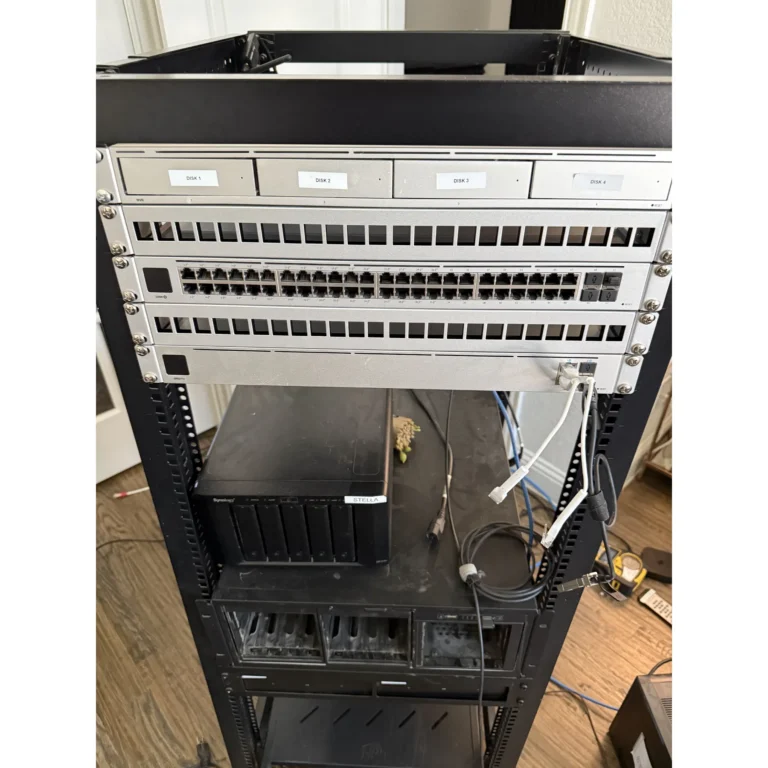
Scope and handoff
From cable connections to a working business network
A cable drop is only part of an office network. Network installation also needs decisions about the internet handoff, routing, switching, access points and the configuration that lets the agreed devices connect.
- Plan the equipment and layout
- Review rooms, wired devices, wireless coverage needs and existing equipment. For a move or build-out, coordinate internet readiness and installation timing before staff arrive.
- Separate the physical and configured scope
- Identify which cabling, equipment supply, configuration, Wi-Fi tuning and testing are included. Reuse suitable equipment where the agreed plan allows; do not assume a full replacement is necessary.
- Agree on the handoff
- Define the labels, network information and business-owned account access needed for future support. Ongoing managed IT and later changes are separate unless included in the written agreement.
Plan around the real conditions
A practical site walk before work starts
Walls, shelving, building materials, customer areas, staff workflow, and internet entry points all affect the right plan. A site walk makes the scope clearer before installation begins.
Physical infrastructure
Identify where equipment should live, where wired devices and access points need service, and how cable paths can be handled.
Future support
Plan for identifiable endpoints, an understandable equipment area, and information that makes later troubleshooting less of a guessing game.
A practical process
Clear next steps, not a generic sales pitch
For an existing network, the first step may be focused cleanup rather than full replacement. The goal is to match the scope to the condition of the environment and the work it needs to support.
Walk the space
Review the ISP handoff, important rooms, existing equipment, known problems, and planned device locations.
Define the installation scope
Coordinate network equipment, Wi-Fi needs, cabling, rack organization, and timing around the actual space.
Test and hand off
Tune the agreed work, organize what was changed, and document the useful support context.
Questions
Common questions
Can you plan both wired networking and Wi-Fi?
Yes. The work can include access-point planning, the drops and cable paths that support it, equipment organization, testing, and documentation.
Can you clean up an existing network?
Yes. A review can begin with current equipment, wiring, coverage, known problems, and documentation gaps before a larger change is recommended.
Can you help with a move or remodel?
Yes. Planning before furniture, devices, and staff are in place makes it easier to account for internet service, equipment location, cabling, Wi-Fi, printers, phones, and future growth.
How is network installation different from structured cabling?
Structured cabling covers the physical data paths and terminations. Network installation brings the agreed equipment, internet handoff and configuration together with wired and wireless connectivity. The written scope should make that boundary clear.
How do I get a current network installation quote?
Share your city, space layout, current internet service, device needs and any opening or move-in date. Existing equipment, cable access, coverage requirements and scheduling determine what needs to be assessed and quoted.
Related services
Connect the physical and technical work
Before you request a quote
Useful planning guides
Talk through the next step
Plan the network before the interruption becomes routine
Share the city, business type, floor plan or photos if available, current internet provider, known network problems, and any move-in or opening date.
Service priorities
Network installation, cabling, and Wi-Fi planning belong together
A stronger network installation page should answer where cable runs land, whether access points need Ethernet and PoE, what rack cleanup includes, how existing cabling is tested, and how the finished network will be documented.